Metal keycaps for gaming keyboards are no longer just a visual upgrade. For buyers comparing materials, the real question is how much extra stability, durability, and tactile confidence metal can add without making the board feel harsh, noisy, or incompatible with the rest of the layout. In our experience, the answer depends on switch type, game genre, and how the keyboard is used day to day.
If you already source compact metal accessories, our custom keychain manufacturing solutions are a useful reference point for thinking about small-part forming, edge quality, finish consistency, and batch repeatability. The same production logic that matters for a precision metal keychain also matters for a keycap: tooling accuracy, surface treatment, engraving depth, and sample approval all shape the final feel on the desk.
Metal Keycaps for Gaming Keyboards: What Buyers Should Know
Metal keycaps replace standard plastic tops with aluminum, zinc alloy, stainless steel, or hybrid metal constructions. Some are simple accent keys; others are full sets designed to change the feel and look of the whole board. Buyers usually consider them when they want a cooler surface, clearer finger placement, and a more premium visual identity than regular ABS or PBT caps can deliver.
From a sourcing point of view, the biggest advantage is not just appearance. Metal opens more possibilities for weight, finish, engraving, and sculpted shape. The trade-off is that the same density that improves stability can also increase noise, change the sound profile, and add compatibility questions that plastic buyers rarely have to think about.
- Stability: heavier caps can feel planted on the switch stem.
- Visibility: metallic surfaces can highlight key groups or branding.
- Customization: molds, engraving, and plating can create a distinctive set.
Why Gamers Consider Metal Keycaps: Performance, Feel, and Visual Impact
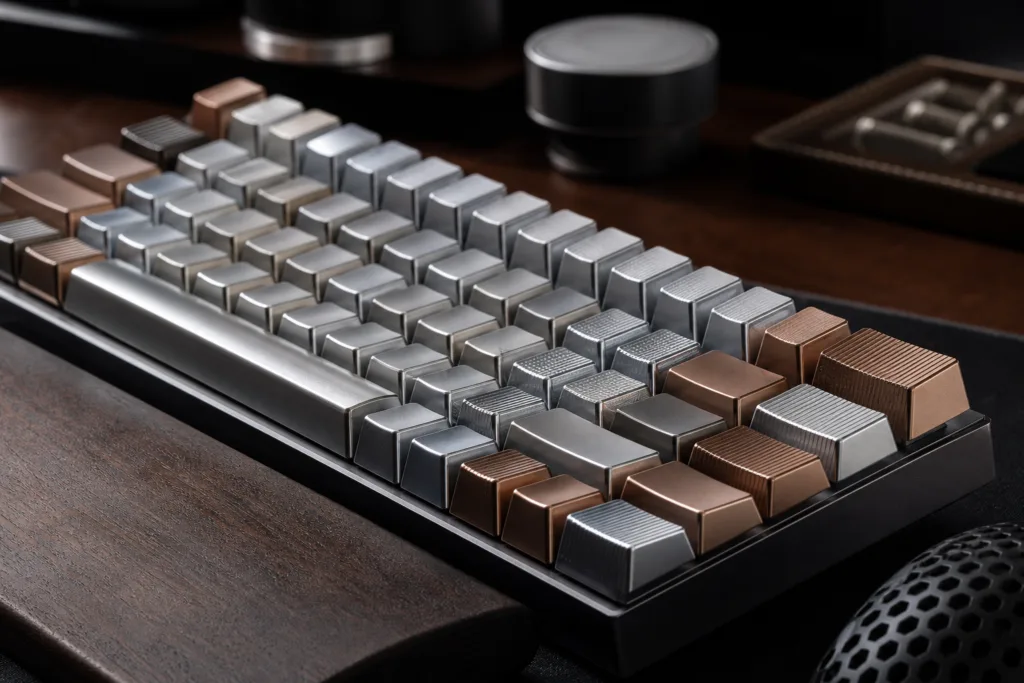
Gamers usually notice metal keycaps in three ways. First, the top surface often feels more solid under the fingertip, which can make key location feel more deliberate. Second, the visible finish changes the way a keyboard looks under desk lighting and RGB. Third, the added mass can make selected keys feel less hollow and more controlled during repeated presses.
That last point is often the most misunderstood. The keycap does not change the switch’s actuation point, but it does change the sensation before and after actuation. On a fast board with linear switches, that can feel clean and precise. On a very light setup, it can feel noticeably denser. Buyers should judge the cap and the switch as a system, not as separate parts.
Metal vs. Plastic Keycaps: Key Differences in Weight, Durability, Texture, and Sound
| Factor | Metal Keycaps | Plastic Keycaps | Buyer Takeaway |
|---|---|---|---|
| Weight | Heavier and more planted | Lighter and easier to move | Metal suits buyers who want a denser feel; plastic suits faster, lighter setups. |
| Durability | Strong surface wear resistance | Can shine or wear faster with heavy use | Metal usually keeps its look longer, but the finish still matters. |
| Texture | Can feel cool, smooth, brushed, or engraved | Usually textured or matte in predictable ways | Texture choice matters as much as the base material. |
| Sound | More likely to sound solid or bright | Usually softer and less resonant | Metal may need noise control if the keyboard is used in a quiet space. |
| RGB and light | Can block or redirect light depending on design | Often more light-friendly | Backlit boards need careful planning for legends and cutouts. |
| Cost | Usually higher due to material and finishing | Usually lower and easier to mass produce | Metal is a premium choice, so cost-performance has to be justified. |
For most buyers, the comparison comes down to whether the keyboard needs to feel more premium or more effortless. Plastic is usually the safer default for all-day typing and broad compatibility. Metal becomes attractive when a buyer wants a stronger tactile statement, more durable branding, or a selected set of accent keys that stand out from the rest.
Common Metals and Finishes Used for Keycaps
Aluminum is often chosen when the goal is to keep weight under control while still getting a clean metal feel. Zinc alloy is useful when the design needs deeper shape, more relief, or a heavier hand-feel. Stainless steel can provide a very rugged surface, but it usually brings more mass and a more pronounced metallic sound. The right material depends on whether the buyer is prioritizing profile, weight, cost, or visual detail.
Finishing is just as important as the base metal. Anodizing can work well on aluminum when color consistency and a clean matte look matter. Plating can create brighter or more premium-looking surfaces. Polishing delivers a sharper reflection, while antique and brushed finishes reduce glare and hide use marks better. When a design needs deeper relief, raised symbols, or sharper edge definition, die-cast metal customization for detailed designs follows the same manufacturing logic we use for compact metal parts: the mold decides how crisp the edges are, how the surfaces flow, and how repeatable the batch will be.
How Metal Keycaps Affect Gaming Performance
In practical use, metal keycaps influence performance mostly through feel, feedback, and consistency. A heavier cap can make repeated presses feel more anchored, which some players like on movement keys or frequently used macro keys. The finger receives a clearer sense of where the key is, which can reduce accidental slips when hands are moving quickly across the board.
That does not mean every player should switch every key to metal. Fast FPS players often prefer a balanced setup with only a few metal accents, because full metal sets can feel heavier during rapid strafing or recoil control. MMO and strategy players may be more open to a denser feel on more keys. Rhythm-game users often need to be especially careful, because repeated taps make weight, noise, and return feel more noticeable over time.
Durability and Wear Resistance: What Metal Keycaps Do Better and Where They Have Limits
| Wear Point | What Metal Usually Does Well | Where Buyers Should Be Careful |
|---|---|---|
| Surface wear | Metal usually resists the shiny wear pattern seen on some plastics. | Coatings and plating can still show polishing or color changes over time. |
| Legend visibility | Engraved or recessed marks can stay readable for a long time. | Shallow marking or weak contrast may become hard to read. |
| Corner damage | Metal is generally more resistant to everyday scuffs. | Sharp impacts can still dent or nick thin edges. |
| Corrosion | Good finishing helps protect the surface. | Low-quality plating or poor storage can still cause issues. |
| Long-term appearance | Metal can keep a premium look if the finish is well chosen. | Highly reflective finishes can show fingerprints and micro-scratches. |
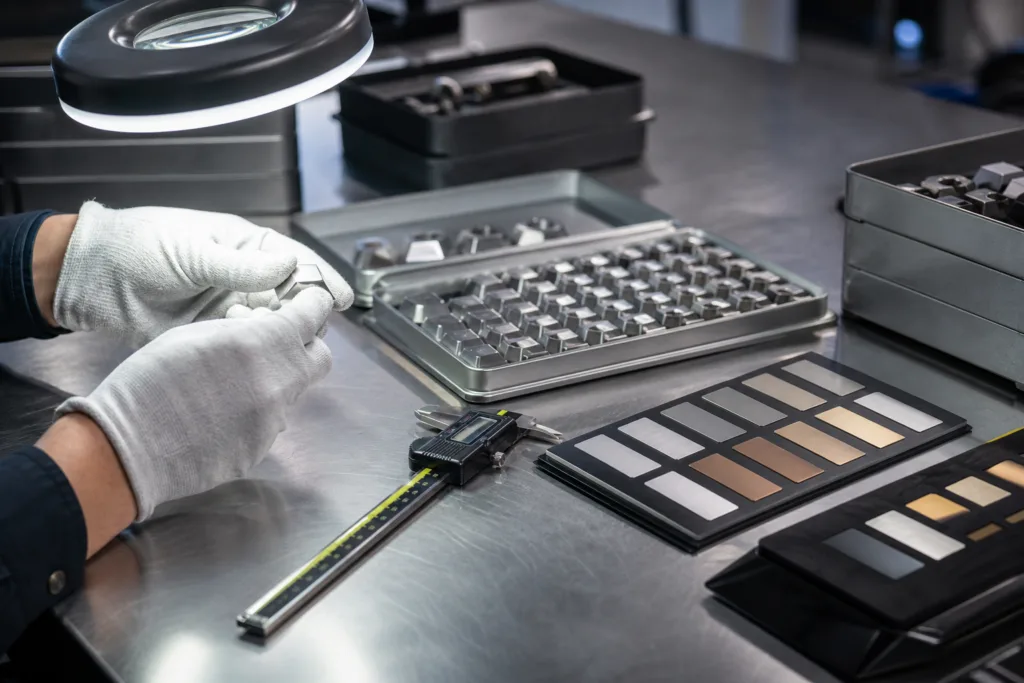
Metal is durable, but not invincible. Buyers should still ask how the surface is protected, how deep the engraving is, and whether the finish is intended for daily contact or display-first use. A good sample tells the story quickly: if the edges feel smooth, the coating looks even, and the legend remains readable in angled light, the design is probably on the right track.
Customization Options for Gaming Keyboards
Customization is where metal keycaps become especially interesting for brands, streamers, and enthusiast setups. Buyers can specify key profile, row height, surface texture, logo placement, symbol style, color blocking, and packaging. Some projects use a single highlighted cap for a logo or function key, while others build a small set around movement keys, macros, or scene-control shortcuts.
For private label projects, we also look at how the caps will be presented in the box. A premium insert tray, labeled compartment layout, or simple protective pouch can change how the product is perceived before it is even mounted. This matters when the keyboard is sold as a gift item, a creator accessory, or a limited-edition bundle.
- Profiles: confirm OEM, Cherry, sculpted, or low-profile compatibility.
- Legends: choose recessed, engraved, filled, or contrast-marked details.
- Colors: match the keyboard case, key set, or brand palette.
- Textures: use brushed, matte, polished, or sandblasted surfaces for grip.
- Packaging: protect the finish and support retail or bulk distribution needs.
Design Trends in Gaming Keycaps
We usually see four design directions in the gaming category. Minimalist sets focus on clean geometry and restrained branding. RGB-friendly sets use cutouts, contrast legends, or mixed materials to keep lighting visible. Industrial styles lean into brushed metal, dark plating, and strong edges. Premium custom looks combine color separation, polished highlights, and more decorative forms.
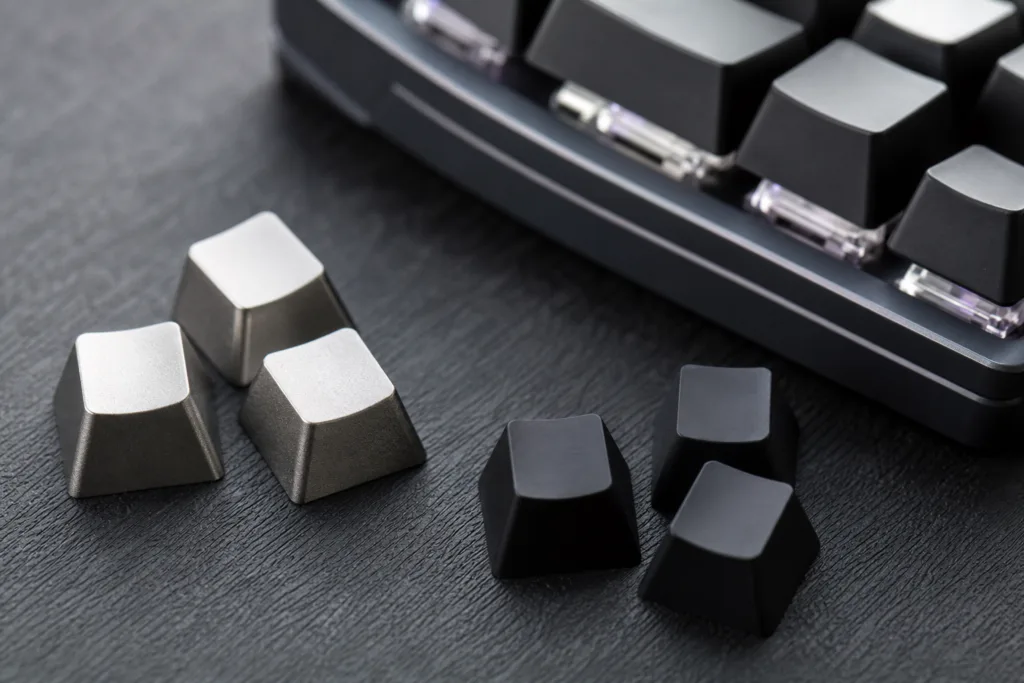
When buyers want a higher-end appearance without making the board feel overloaded, mixed finishes often work well. A dark base with a lighter top surface can make a keyboard easier to read and more visually structured. For that kind of layered look, two-tone plated finishes for premium style are a useful reference because the same plating discipline that creates a clean contrast on a small metal accessory also helps define the visual rhythm of a keycap set.
Choosing Metal Keycaps by Gaming Style
| Gaming Style | What Matters Most | Metal Keycap Fit |
|---|---|---|
| FPS | Fast movement, clear key location, low distraction | Best as selective accent keys rather than a heavy full set. |
| MOBA | Stable repeat presses and quick visual grouping | Good for a few high-use keys or numbered shortcuts. |
| MMO | Macro access, durability, and easy legend reading | Works well when symbols are clear and contrast is strong. |
| Rhythm games | Consistency, sound, and light control | Possible, but sample testing is important before committing to a full set. |
| Hybrid gaming and typing | Comfort, layout familiarity, and long-session feel | Best with a balanced mix of metal accents and softer plastic keys. |
The table above is a useful starting point, but personal preference still matters. A player who enjoys a denser tactile response may welcome more metal, while someone who prioritizes speed and quieter operation may only want a few showcase caps. The right setup is the one that supports the way the board is actually used.
Compatibility Checklist: Switch Type, Stem Fit, Row Profile, Height, and Keyboard Layout
- Stem type: confirm the cap matches the switch stem, usually MX-style for most mechanical boards.
- Underside fit: check that the metal wall thickness does not interfere with stabilizers or neighboring keys.
- Row profile: make sure the sculpted height matches the row it will sit on.
- Layout: verify whether the keyboard is full size, TKL, 75%, 65%, or a custom layout.
- Backlighting: confirm how much light passes through or around the cap.
- Sound: test whether the added mass changes the board noise in a way that is acceptable for the user environment.
Compatibility is where many first-time buyers lose time. A cap can look perfect in photos and still feel wrong if the profile is too tall, the stem fit is too tight, or the lighting effect is not what the buyer expected. A sample on the actual board is always better than a general assumption.
Manufacturing and Quality Factors That Matter
From our manufacturing side, Gairun treats a metal keycap as a precision part, not just a decorative cover. We pay attention to tolerances, wall thickness, finish uniformity, and the way the underside interacts with the switch stem. Small changes in geometry can affect wobble, sound, and fit, so sample approval is not a formality; it is the stage where the real user experience becomes visible.
| QC Factor | Why It Matters | What Buyers Should Ask For |
|---|---|---|
| Tolerances | Loose fit can create wobble; tight fit can damage stems. | Sample on the exact switch style and board layout. |
| Surface finish | Finish affects grip, reflections, and perceived quality. | Photos or samples under real lighting conditions. |
| Coating or plating | Protects appearance and influences wear. | Clarify the process and expected use environment. |
| Noise control | Metal can sound brighter or more resonant than plastic. | Test the cap on a full keyboard before bulk approval. |
| Batch consistency | Important for matching colors, gloss, and size across a set. | Ask how production keeps repeat orders consistent. |
For legends, symbols, and small brand marks, engraving methods for crisp branding details help us keep marks readable after repeated use and cleaning. The decision is not only about how the logo looks on day one. It is also about how clearly the mark survives contact, whether the depth is enough to stay visible, and whether the chosen finish keeps the contrast stable over time.
Care, Cleaning, and Long-Term Maintenance
Metal keycaps are usually easy to clean, but they should still be treated carefully. A microfiber cloth and mild cleaner are usually enough for daily maintenance. Harsh abrasives, rough pads, and strong solvents can damage plating, reduce surface sheen, or blur engraved details. Fingerprints are normal on some finishes, especially polished ones, so buyers should choose a finish that matches the owner’s tolerance for upkeep.
If the keyboard will be used in a shared office, gaming lounge, or retail display, the cleaning routine matters more than many buyers expect. A finish that looks excellent in a product photo may need regular wiping in real life. For that reason, buyers should always weigh visual impact against maintenance effort.
When Metal Keycaps Are Worth the Upgrade and When Plastic May Be the Better Choice
Metal keycaps are worth the upgrade when the goal is premium presentation, stronger key identification, or a more substantial feel on selected keys. They are also a good fit for branded keyboards, creator merchandise, special editions, and high-touch accent keys that need to stay presentable over time.
Plastic may still be the better choice when the user wants a lighter board, lower cost, softer sound, and broad backlight transmission across the whole layout. For many buyers, the best solution is not all-metal or all-plastic. It is a mixed setup that uses metal where the user needs emphasis and plastic where speed, comfort, or light output matters more.
Common Buyer Mistakes to Avoid When Selecting Metal Keycaps
- Choosing appearance first: a good finish still fails if the cap feels awkward in use.
- Ignoring stem fit: the wrong underside geometry can cause wobble or installation issues.
- Overlooking lighting: opaque metal can reduce RGB effect if the design is not planned carefully.
- Skipping a sample: photos rarely reveal sound, balance, or edge comfort.
- Forgetting the game style: a setup that works for MMO keys may not suit FPS muscle memory.
- Not planning packaging: finish protection matters if the set is shipped, stored, or resold.
Conclusion
For buyers comparing metal keycaps for gaming keyboards, the best choice is the one that matches the board’s switch feel, the player’s gaming style, and the final presentation goal. Metal can improve stability, create a more premium look, and support strong customization, but it also asks more from the buyer in terms of compatibility, finish selection, and sample approval. When those details are handled well, metal keycaps can be a practical upgrade rather than just a cosmetic one.
FAQ
Are metal keycaps too heavy for gaming?
Usually not for standard accent keys, but full metal sets add mass and can feel slower on very light boards. The safer choice is to start with a few metal modifiers or a sampled set, then confirm that the board still feels comfortable in your fastest games and long sessions.
Do metal keycaps affect RGB lighting?
Yes, they can. Opaque metal blocks light, so RGB visibility depends on cutouts, side glow, legends, or mixed-material designs. If backlighting matters, ask for a sample on your actual keyboard and check how much light reaches each row.
Which games benefit most from metal keycaps?
FPS players often like the stable, easy-to-find feel on movement keys, while MMO or hybrid users may value the premium look on selected macro keys. Rhythm and high-speed typing users usually need to pay the most attention to weight and noise before choosing a full set.
What materials are most common for metal keycaps?
Aluminum is lighter and easier to finish cleanly, zinc alloy supports more sculpted detail, and stainless steel is tougher but usually heavier. The right choice depends on whether you want a lighter accent piece, a dense premium feel, or a more rugged surface.
How do I check compatibility before ordering?
Match the stem type, row profile, keyboard layout, and key height before ordering. If possible, test one sample on the exact switch and board you plan to use, because small changes in wall thickness or underside geometry can affect fit and sound.
Are metal keycaps comfortable for long sessions?
They can be, but comfort depends on profile, edge rounding, and total weight. A well-designed metal cap should feel smooth and secure, not sharp or fatiguing. For long sessions, many buyers prefer metal on select keys rather than every key on the board.