
A complete product artwork views checklist should answer one question: can a manufacturer understand the product’s shape, construction, orientation, decoration, and attachments without guessing? A front view establishes the main face, but it may hide thickness, reverse hardware, openings, relief direction, and component relationships. For guidance on preparing artwork and proofs, see Artwork Design and Proofing.
For most custom metal awards and promotional products, add a reverse view when the back matters, a side or section view when depth matters, and detail or separated views when an interface cannot be read at overall scale. This front back product drawing approach gives the quotation and engineering stages a controlled reference. It also helps buyers identify unanswered decisions before tooling begins.
When a Front View Is Not Enough
A front view is useful for the visible outline, branding, graphic hierarchy, color areas, and front-face layout. It can show the main logo, border, lettering, and the relative importance of raised or printed features. It does not automatically explain the complete physical product.
Information commonly hidden from the front includes total thickness, edge treatment, rear attachment, back-face artwork, holes, cut-outs, recesses, relief height, assembly order, and clearance between connected parts. A small opening may look decorative in a flat image but perform a structural or functional role in the finished item.
Use this practical decision rule:
- Add a back view for reverse artwork, attachment placement, hidden recesses, and reverse text direction.
- Add a side, edge, or section view for thickness, profile, raised areas, recessed areas, and component projection.
- Add a detail view for small holes, hooks, clasps, pins, pivots, rotating joints, or functional openings.
- Add separate or exploded views when pieces are made, decorated, packed, or assembled independently.
Technical drawing guidance from MIT OpenCourseWare on orthographic views, section views, and dimensioning explains why coordinated views communicate geometry more completely than one projection.
Example 1: Fixed One-Piece Award Medal
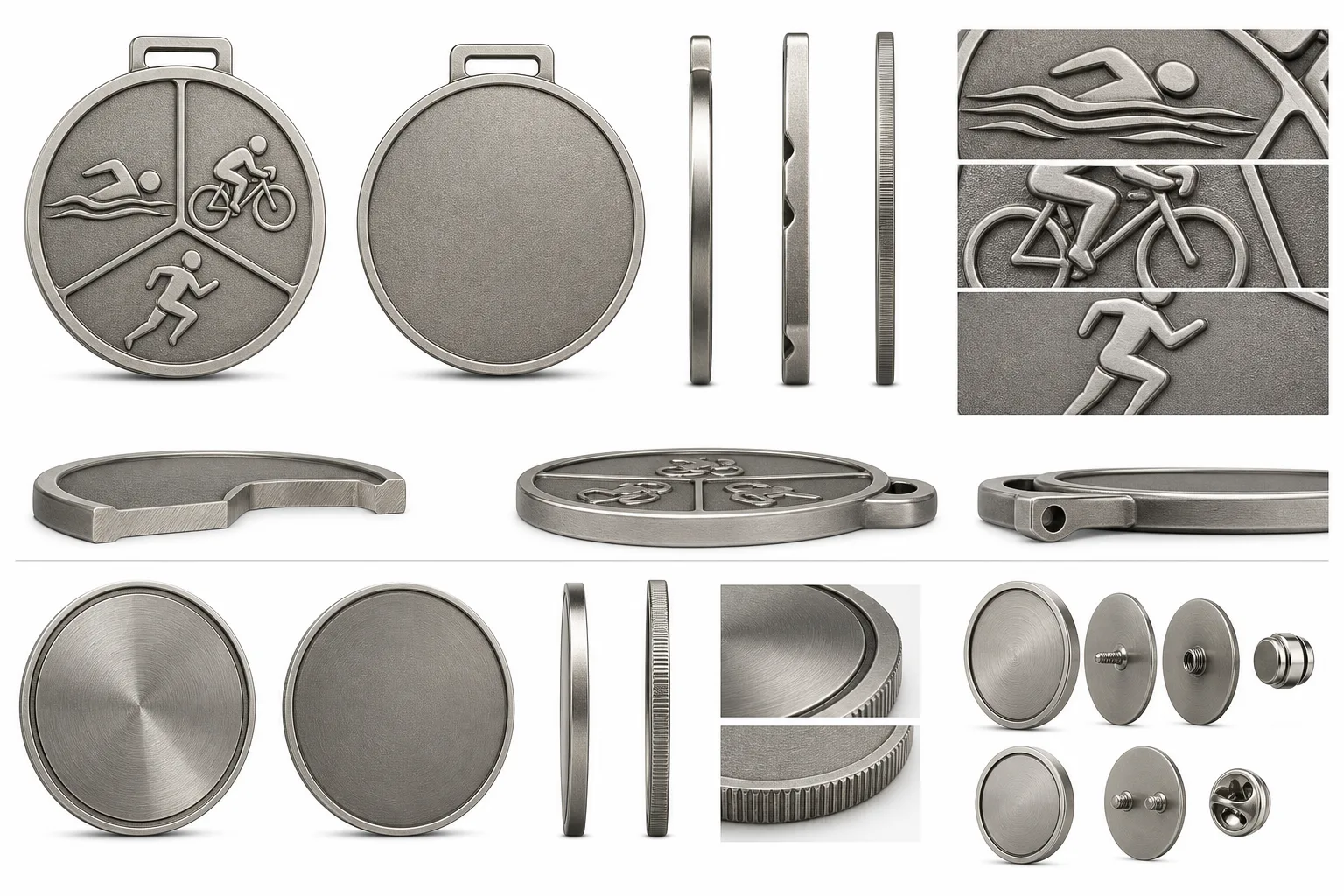
The artwork shows a fixed circular medal with an event emblem on the front and a sponsor message on the reverse. The initial decision is a one-piece medal structure because the main body has no rotating or connected element. The pack still needs front and back artwork, dimensions, relief direction, openings, and the hanging attachment.
The missing variable is the reverse connection. A pin, loop, or hanging hole changes the back layout and may affect the surrounding relief or border. A one-piece body should not be assumed to be simpler or cheaper without a quotation.
Example 2: Branded Metal Bottle Opener
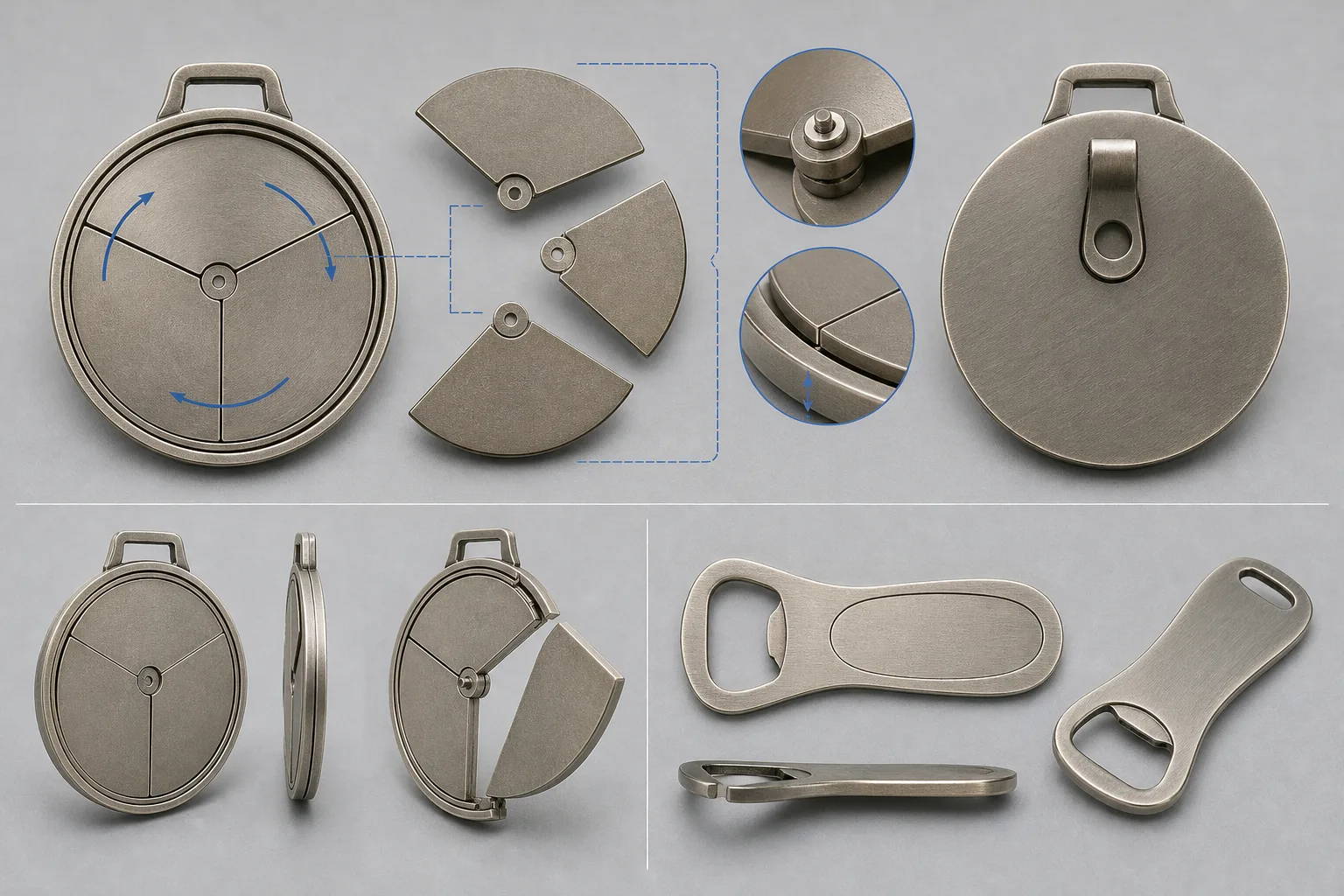
The front face carries a brand mark, while the lower end contains the functional opening. The initial drawing should separate the logo zone from the load-bearing opening and grip structure. The side view should show body thickness, edge treatment, and any projection caused by a coating or overmold.
The variable that could change the decision is intended use. Frequent opening, cleaning exposure, print wear, or a request for a hanging hole may require different construction or validation. A decorative front view alone cannot establish whether the logo area conflicts with the working structure.
Build the Front, Back, Side and Detail View Set
Each view should answer a different manufacturing question. Keep the views aligned, clearly labeled, and consistent with the finished orientation. Labels such as front, reverse, top, bottom, left, right, and assembled view reduce the risk of an asymmetric part being interpreted backwards.
- Front view: Mark the finished outline, visible borders, logo zones, relief hierarchy, color boundaries, and orientation. Identify which forms sit forward and which remain recessed.
- Back view: Show reverse artwork, backing hardware, attachment location, hidden recesses, reverse text direction, and any back-side finish.
- Side or edge view: Show base thickness, profile, rounded or chamfered edges, openings, raised areas, recessed areas, and how far components project.
- Section view: Use a cut-through representation when an internal profile, layered construction, cavity, or opening cannot be understood from the outside.
- Detail view: Enlarge small interfaces such as a clasp, pin, hook, rotating joint, connection point, or functional opening.
- Exploded view: Separate components when they have different finishes, decoration, packaging positions, or assembly steps.
For challenge coins, treat the edge, border, thickness, front face, and reverse face as one structure. The drawing should address front-to-back text direction, border continuity, face alignment, and edge orientation. Do not treat an edge treatment as confirmed until its forming route has been assessed.
Raised or sculpted products also need a clear relief hierarchy. A 3D medal or challenge coin may use multiple sculpted levels, but the artwork must identify the dominant subject and supporting field. Exact relief depth remains an item for engineering and proof confirmation.
Map Separate, Moving and Functional Components
A component artwork pack should include a register, not only a finished rendering. List each part name, quantity, material or finish assumption, related views, connection method, and whether it moves, detaches, rotates, or performs a function.
For spinning or combination medals, show the movement direction, pivot or connection points, alignment, visible clearances, and assembled relationship. These products use moving or connected parts and should be considered as an assembled system. A moving design should not be described as production-ready before engineering input.
For attachment-backed items, show the exact rear hardware position and the installation area. Identify whether the product uses a pin, magnet, clasp, hook, loop, or another attachment. The attachment affects the back finish, package orientation, wearing position, and sometimes the product’s balance.
For a triathlon medal, scenario guidance may begin with an overall size of 70–90 mm and a base thickness of 3.5–5 mm. Swimming, cycling, and running zones may be divided or rotating. These values are a starting scenario, not a universal specification. The final pack must confirm maximum size, thickness, relief, estimated weight, hanging structure, surface treatment, and packaging.
For a promotional bottle opener, a scenario may use a 70–110 × 25–45 mm format and 2–4.5 mm body thickness. The logo area should remain separate from the functional load-bearing structure. Opening cycles, cleaning exposure, print wear, grip, and any coating require validation for the intended use.
Functional and safety checks depend on the product. Moving parts, sharp corners, magnets, functional openings, cleaning environments, and attachment retention may each require additional information or testing. Keep these requirements visible in the component register rather than leaving them in informal email comments.
Add Dimensions, Orientation and Finish Specifications
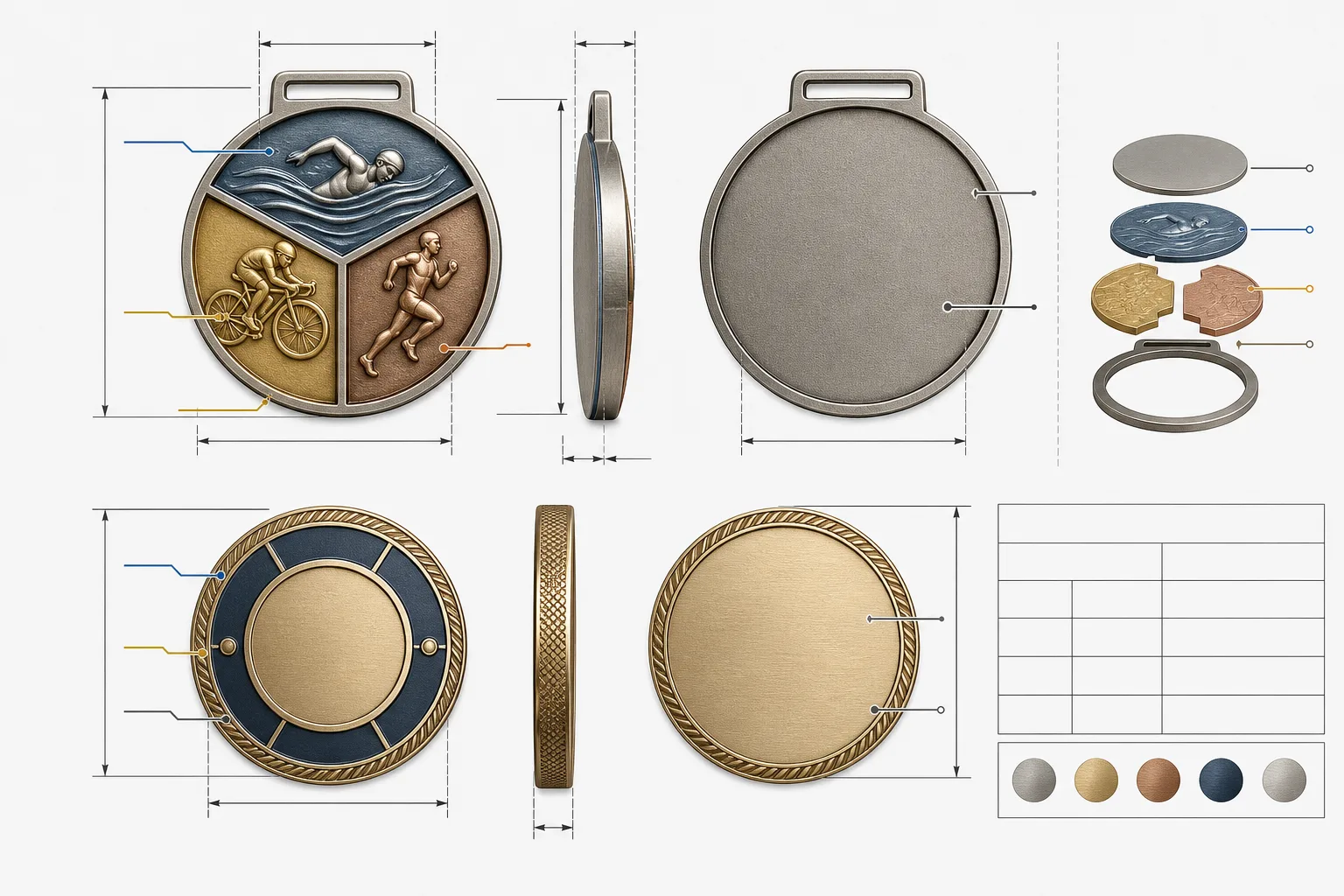
A visual drawing becomes a manufacturing reference when every important feature is measurable or clearly marked as unresolved. Include overall maximum dimensions, component dimensions, base thickness, assembled thickness where relevant, hole or opening dimensions, and attachment locations.
Dimension from clear reference edges or datums. Do not rely on image scale. State whether each dimension applies to the finished product, an individual component, or the assembled system. If a size is only an initial preference, label it as such.
Mark relief direction and hierarchy, including raised, recessed, layered, sculpted, and printed areas. Draw boundaries between plating, enamel, epoxy, and printing zones. For die-struck badges, separate the formed raised and recessed metal structure from later decoration. For die-cast pins, define the outline, thickness, rear attachment area, and dimensional relief before tooling.
Material selection should be considered with geometry, forming method, relief, decoration, and intended use. Gairun lists zinc alloy, brass, iron, stainless steel, and aluminum among metals it can process for custom products. That list does not create a universal ranking for cost, strength, corrosion behavior, or sustainability.
| Observable input | Practical implication | Initial decision | Confirmation still required |
|---|---|---|---|
| Fixed body with no connected parts | Views focus on faces, edge profile, relief, and attachment | Use front, reverse, and side views | Confirm thickness, opening, hardware, and finish |
| Rotating or connected components | Assembly and clearance affect movement | Add separated and assembled views | Confirm pivot, alignment, clearance, weight, and retention |
| Attachment hidden on the reverse | Hardware may alter balance and back decoration | Show a dimensioned reverse view | Confirm attachment type, position, and installation space |
| Opening used for function | Decorative artwork must not occupy a load-bearing area | Separate logo and working zones | Confirm use frequency, edge treatment, cleaning, and validation |
| Separate pieces with different finishes | One overall view cannot define every component | Use a component register and detail drawings | Confirm material, finish, assembly, and packaging positions |
Include a specification block containing product type, intended use, overall size, thickness, material, construction, attachment, finish, color references, component list, packaging requirement, destination, and open decisions.
Organize Files, Revisions and Approval Status
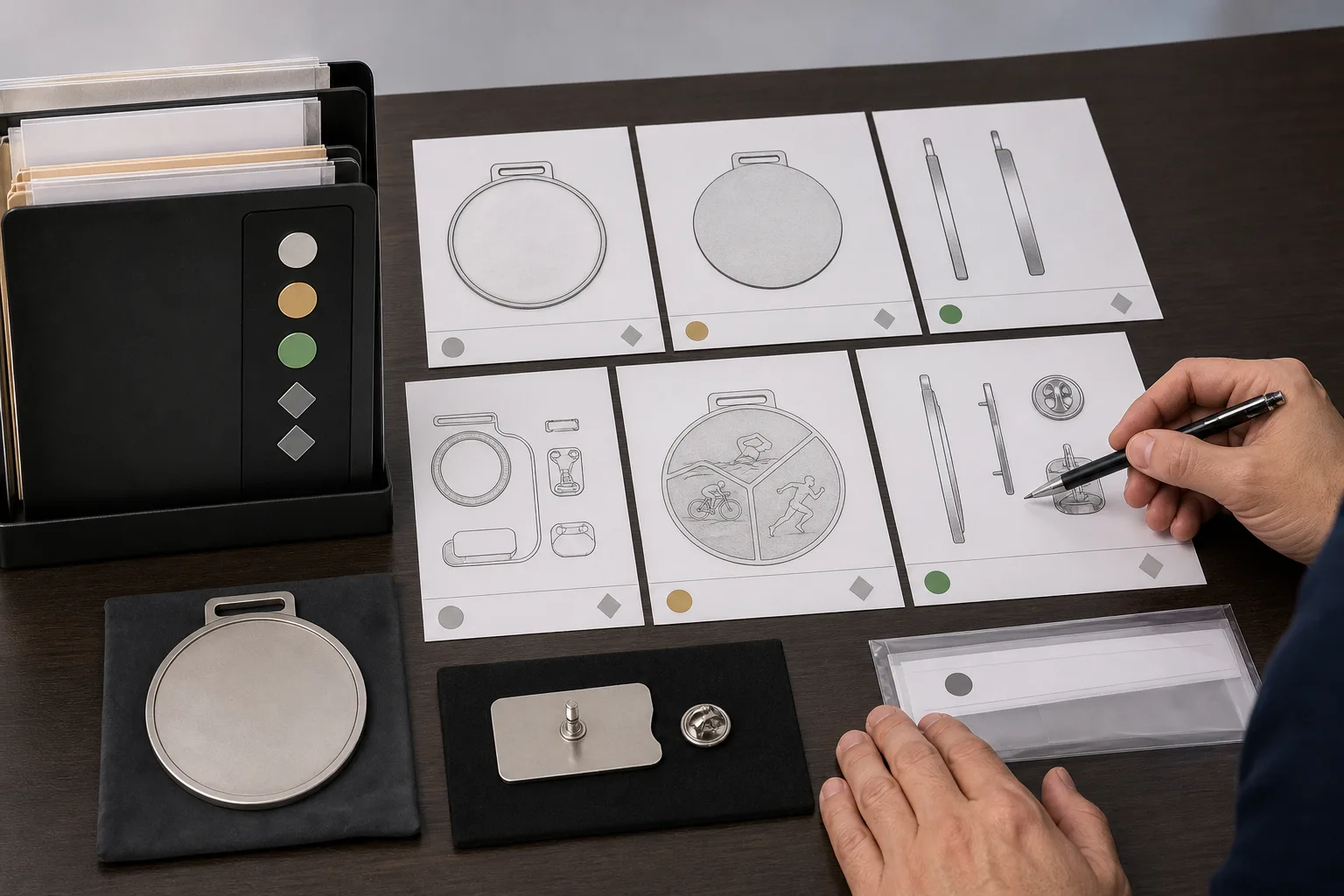
Use a master index for the artwork pack. Record the product name, variant, component, view type, file name, revision, date, and approval status. This makes it clear which files belong together when several variants or components are quoted.
Keep editable source files, print-ready PDFs, reference images, and rendered 2D or 3D proofs in separate groups. Identify which file controls dimensions and which file is visual reference only. A vector file, usable PDF, or hand-drawn concept can begin an artwork discussion when accompanied by available dimensions, wording, color references, front and back instructions, attachments, and intended product format. No file is automatically production-ready.
Use one revision code across the pack. Record changes to dimensions, wording, orientation, attachment, finish, packaging, or component structure. Mark unresolved choices directly instead of allowing a missing value to be interpreted as approval.
Keep artwork acceptance separate from commercial approval, testing approval, packaging approval, and shipment authorization. Tooling begins only after the relevant production artwork has been reviewed and accepted. That acceptance does not approve every later change or every commercial, testing, packaging, or shipment term.
When selected, a custom sample is used to assess the proposed buyer-specific appearance and construction. Sample approval and authorization for bulk production remain separate steps. A stock sample can demonstrate general workmanship, finish, construction, or packaging, but it is not proof of the buyer’s custom design. Availability and delivery cost should be confirmed separately.
Run the Multi-View Artwork Pack Checklist Before Sending an RFQ
Before sending an RFQ, use this manufacturing artwork checklist to identify missing inputs:
- Product definition: State the product type, intended use, design variant, assembled or one-piece construction, and quantity.
- View completeness: Include front, reverse, side or edge, section or detail views where needed, and separated component views.
- Physical specification: Provide overall dimensions, thickness, relief direction, openings, borders, edge treatment, attachment position, component alignment, and estimated weight when relevant.
- Appearance: State the material assumption, finish or plating, color references, enamel or print areas, text orientation, logo placement, and acceptable alternatives.
- Functional notes: Describe moving-part clearance, attachment retention, sharp-corner treatment, magnetic conditions, functional openings, cleaning exposure, and required validation.
- Packaging and logistics: State individual protection or presentation packaging, destination, required schedule, and the difference between production time and shipping time.
- Open decisions: Mark unresolved technical choices so they can be addressed during quotation and engineering discussion.
A useful Gairun RFQ includes product type, quantity, dimensions, artwork, design variants, finish, color treatment, attachments, packaging, destination, and required schedule. Material, forming, shipping, and trade-term preferences can be added when known. The pack should support engineering assessment rather than invent missing specifications.
Production time and shipping time are separate schedule elements. Destination, transport mode, customs arrangements, packaging, and approval timing can affect the delivered date, so keep the requested schedule visible in the RFQ.
Use the Approved Pack as the Next Project Control Point
Submit the indexed artwork pack with the RFQ and a short list of unresolved decisions. Ask the manufacturer to assess the proposed construction, component arrangement, finish, attachment, and intended use before tooling or production commitments.
For a first article, use an approved 1:1 drawing or proof as the comparison reference when applicable. Gairun states that, after tooling and trial forming, the first article is compared with the approved 1:1 drawing for dimensions, thickness, and relief detail. Project tolerances must be specified separately.
For functional, moving, magnetic, wearable, or destination-specific products, request the applicable validation and documentation plan before approval. Requirements can change with product type, material, finish, intended use, attachments, packaging, and destination market.
Retain the final approved revision and link it to the quotation, sample decision, tooling authorization, packaging instruction, and shipment plan. This gives procurement, design, engineering, and production the same reference when a question arises.
To prepare a submission, use Upload Artwork and Specifications with the views, dimensions, open decisions, and intended use. Related guidance is available in the Buyer Resources, while complex structures can be discussed through Engineering Review and Design for Manufacturing.
FAQ
What views should be included in a product artwork pack for a custom metal item?
Start with front and reverse views. Add a side or edge view for thickness and profile, a section view for hidden construction, and detail or separated views for small interfaces or independent components.
When is a side view or section view necessary in a custom metal product drawing?
Use one when the front view cannot show thickness, raised and recessed areas, openings, edge treatment, cavities, or how far a component projects. A section view is useful when the internal profile or layered construction matters.
How should moving parts, attachments, holes, and separate components be shown?
Use a component register, assembled view, separated or exploded view, and enlarged detail views. Identify movement direction, connection points, clearances, attachment type, hole dimensions, and each component’s finish or decoration.
What dimensions and specifications should be included before requesting a quotation?
Include overall size, component size, thickness, openings, attachment locations, relief direction, material assumption, finish, colors, construction, quantity, packaging, destination, and required schedule. Mark uncertain values as open decisions.
Does artwork approval mean that tooling, sampling, packaging, and bulk production are all approved?
No. Artwork acceptance controls the relevant production reference. Commercial terms, testing, packaging, samples, tooling authorization, bulk production, and shipment remain separate approval points.
Can a PDF, vector file, or hand-drawn concept be used for an artwork review?
Yes, these formats can begin the discussion when available dimensions, wording, color references, front and back instructions, attachments, and intended product format accompany the file. The input still needs technical clarification before production.
For more guidance, see Design and Artwork.